
General
This is the official public-facing documentation of the Promethist Platform core that defines runtime to execute conversational AI agents.
It documents everything a third-party developer needs in order to integrate an application with a platform deployment: the engine’s REST API, the real-time conversation protocols, the wire formats and the authorization model. Everything documented here is a supported, externally consumable interface.
Integration Surfaces
The engine offers two distinct integration surfaces, described together in Engine Integration.
- REST API
-
Request/response endpoints under the
/apiprefix used to discover projects and agents, read session history, retrieve evaluation results, manage user data and serve media assets. See Engine Integration. - Pipeline socket
-
Long-lived, bidirectional connections that carry one conversation (a session) consisting of one or more turns. Audio, text and control commands flow in both directions. See Pipeline Socket.
A conversation always runs over one of the following transports:
| Transport | Endpoint | Typical use |
|---|---|---|
Socket.IO |
|
Web and mobile clients; supports automatic reconnect and the compact MessagePack format. |
Plain WebSocket |
|
Native clients and embedded devices that do not want a Socket.IO implementation. |
Twilio Media Streams |
|
Inbound and outbound telephony. See Twilio Telephony Integration. |
HTTP streaming |
|
Text-only integrations, scripting and diagnostics without a socket library. See HTTP Pipeline Channel. |
How a Conversation Flows
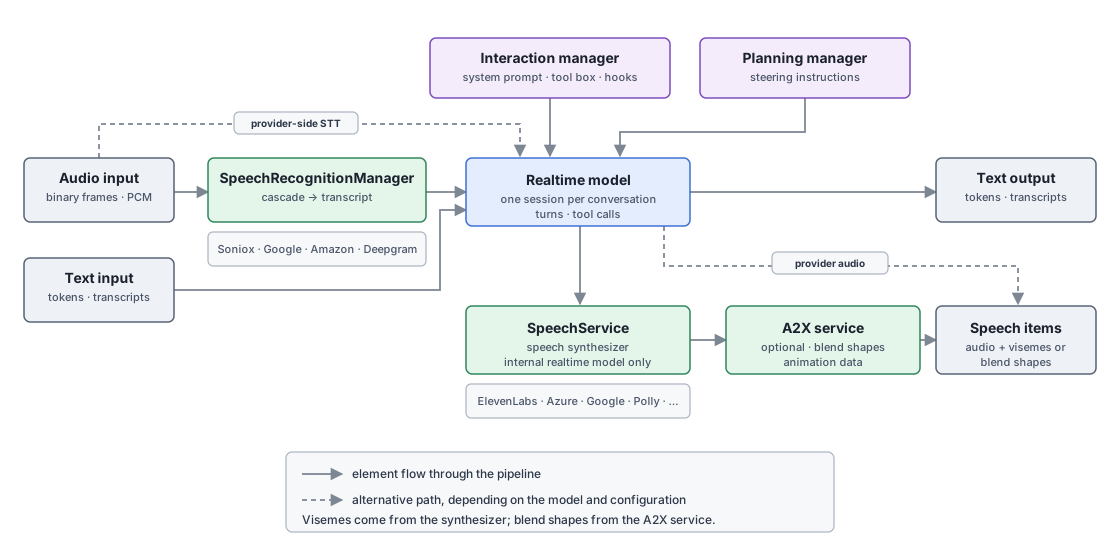
Reading the diagram left to right:
- Input
-
A client sends either audio as binary frames or text as tokens. Audio normally goes to
SpeechRecognitionManager, which runs a cascade of recognition providers — if one fails the next takes over with the audio buffered so far — and turns it into interim and final transcripts. Text input needs no recognition and reaches the model directly. - Provider-side recognition
-
Some models do their own recognition and turn detection. When the session is configured that way the engine’s recognition step is skipped and the audio is forwarded to the provider untouched (the dashed path).
- The realtime model
-
One model session runs for the whole conversation and produces the response. What it says is shaped by two components: the interaction manager, which supplies the system prompt, the tool box and the lifecycle hooks, and the planning manager, which injects steering instructions as the conversation progresses. Tool calls the model makes are executed and reported back to the client as commands.
- Text output
-
Response text reaches the client as streamed tokens and sentences, together with the transcripts of what the user said.
- Speech output
-
For a speech-to-speech provider the audio comes from the provider itself (the dashed path). For the internal realtime model the engine synthesizes it: generated text is streamed into
SpeechService, which drives the configured speech synthesizer, applies chunking and — when enabled — caches the audio. - Animation data
-
Speech items can carry lip-sync data, and there are two independent sources. Visemes are produced by the synthesizer itself, which only some providers support. Blend shapes are produced by the optional A2X service: when it is deployed and the session asks for blend-shape animation, synthesized audio is passed through it and the resulting animation frames are attached to the speech items. Without A2X, or with animation switched off, the speech items simply carry audio.
A client therefore has to handle three kinds of output — transcripts and commands, text, and speech items whose animation payload depends on the agent and the deployment. All of them are described in Pipeline Socket.
Endpoints and Ports
In a deployed environment all traffic is served over HTTPS/WSS on a single host name;
the reverse proxy routes the Socket.IO paths (/socket/io, /socket.io) to the engine’s
Socket.IO listener and everything else to its HTTP listener.
| Surface | Deployed | Local development |
|---|---|---|
REST API, plain WebSocket, Twilio WebSocket |
|
|
Socket.IO |
|
Deployments are region-specific — for example https://eu.promethist.ai.
Use the host name assigned to your integration.
| The reverse proxy uses cookie-based session affinity, so all requests of one conversation are routed to the same engine instance. Preserve cookies on the client side when using the HTTP pipeline channel. |
The Pipeline Key
Every conversation is addressed by a pipeline key in the form {setupName}:{contentRef},
for example agent:acme-support.
-
setupNameselects the engine-side pipeline setup. The setup determines which context service and interaction manager execute the conversation. Which setup names are accepted is deployment configuration;agentis the setup used for regular agents. -
contentRefreferences the content to run — for theagentsetup this is the agentref, optionally revision-qualified (acme-support.5).
The key appears as a path segment (plain WebSocket, HTTP channel) or as the key query parameter (Socket.IO).
A Typical Integration
-
Resolve the project and its agents with
GET /api/v2/project/{idOrRef}orGET /api/v2/project?agentKey={agentKey}(see Project and Agent API). The response drives your UI: branding, terms, available agents and — when the project requires identity — the identity providers to offer for sign-in. -
Authenticate the user if the project requires it, then request the project again to receive the full agent list (see Authentication and Consumer Security).
-
Open a conversation transport with the chosen agent’s key, wait for the
#readycommand, then send#introor the user’s first input (see Pipeline Socket). -
Stream audio or text and render the returned transcripts, speech items and UI elements. End the session by sending
#end. -
Optionally poll
GET /api/v2/evaluation/status?sessionId={sessionId}for the post-session evaluation results of that conversation (see Evaluation API).
Page Map
-
Authentication — JWT, API keys, Basic auth and anonymous access.
- Engine Integration
-
Which surface to use for what, and how they fit together.
-
Pipeline Socket — session lifecycle, parameters, input and output elements.
-
Wire Formats —
TEXT,JSONandMSGPACKencodings with the element type reference. -
Twilio Telephony Integration — Media Streams protocol and outbound calls.
-
HTTP Pipeline Channel — running a conversation over plain HTTP.
-
-
The REST APIs — project and agent, session, user, memory, navigation, feedback, evaluation, development profile, visual and integration — plus the consumer security model that governs them.