
Navigation API
A project can publish navigation specifications — entry points in the host application that an
agent may direct the user to. They are delivered to clients as the navigationSpecifications
array of the project payload returned by GET /api/v2/project/{idOrRef} and
GET /api/v2/project?agentKey={agentKey} (see
Project and Agent API), and the endpoint on this
page resolves whether an individual entry point is currently active for a user.
A specification can also reach the client mid-session, when an evaluation unlocks it — see Runtime Updates.
Navigation Specification Structure
The project payload carries a flat array of specifications. Nesting is expressed through
parentRef, not through embedded arrays — a client builds the tree by grouping entries on their
parentRef and ordering each level by order.
Only specifications that are static and active in the project configuration are published this way. Both flags are server-side gates and neither is part of the payload:
-
isActive— an entry deactivated in the project configuration is dropped from the array entirely. A client therefore never receives an inactive entry and never has to filter on one. -
isStatic— a non-static entry is not part of the navigation the client renders up front. It reaches the client only at runtime, when an evaluation unlocks it (see Runtime Updates).
Common Fields
Every specification, regardless of its type, carries these fields.
| Field | Type | Description |
|---|---|---|
|
String |
Discriminator of the specification type — one of |
|
String |
Stable identifier of the specification within the project. Used as the |
|
String | null |
Ref of the parent |
|
String | null |
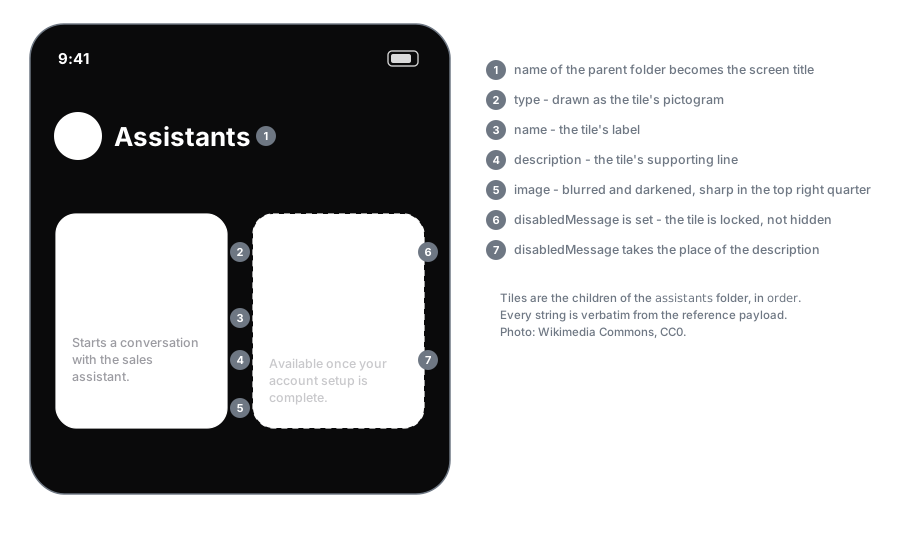
Absolute URL of a background image for the entry, when one is configured. Render blurred and darkened except top right corner to make the rest information in the tile readable. |
|
String |
Human-readable label of the entry, to render in the navigation UI and to use as the title of a
push notification announcing it. Tool-backed types are exposed to the agent under their |
|
String |
Longer description of the entry. May be rendered as a subtitle and is the text the agent reasons over when deciding whether to navigate the user here. |
|
Integer |
Sort order among the siblings sharing the same |
|
String | null |
The locked state of the entry. |
The lock is resolved per user. An entry with no configured condition is never locked; a conditioned entry stays locked until the condition has been satisfied by an evaluation, and every conditioned entry is locked for an unauthenticated request.
A locked entry is still delivered in the payload — render it as locked and surface
disabledMessage, rather than hiding it.
Specification Types
Each type adds its own payload field on top of the common ones.
type |
Extra field | Behaviour |
|---|---|---|
|
none |
Grouping node. Holds no target of its own; its children reference it through |
|
|
Utterance to send to the project’s featured agent ( |
|
|
Action of the host application to invoke, identified by |
|
|
In-app route to navigate to. Currently only agent routes are used: |
|
|
External URL to open, typically in a browser or an in-app web view — e.g. a deal in the customer’s
CRM, |
Reference Example
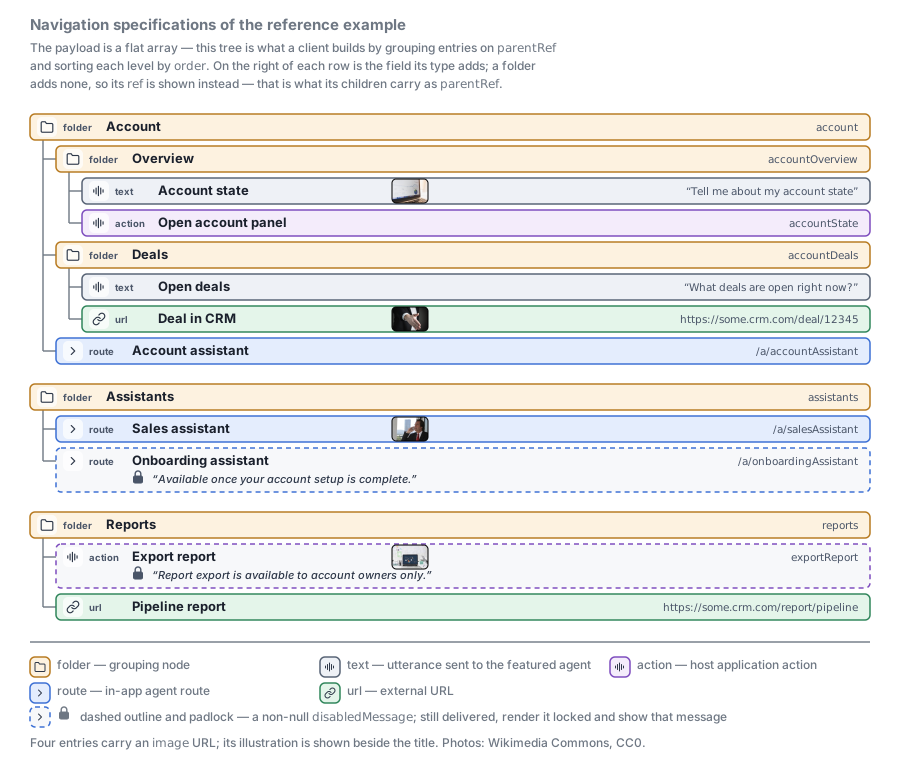
The example below covers every supported type across three top-level folders. Account is the only
one with subfolders — Overview and Deals. The types are spread over the tree rather than
repeated in every folder, which is how a real project is usually laid out. Two entries are locked, and are
exactly the two carrying a disabledMessage; the rest leave it null. Four entries — one per
non-folder type — point image at a real, publicly reachable photograph, shown as a thumbnail
beside their title in the diagram; the folders use placeholder URLs on a fictional CDN.
And the payload that produces it:
{
  "navigationSpecifications": [
    {
      "type": "folder",
      "ref": "account",
      "parentRef": null,
      "image": "https://cdn.example.com/acme/nav/account.png",
      "name": "Account",
      "description": "Everything about the account the user is working on.",
      "order": 1,
      "disabledMessage": null
    },
    {
      "type": "folder",
      "ref": "accountOverview",
      "parentRef": "account",
      "image": null,
      "name": "Overview",
      "description": "Current state of the account.",
      "order": 1,
      "disabledMessage": null
    },
    {
      "type": "text",
      "ref": "accountState",
      "parentRef": "accountOverview",
      "image": "https://upload.wikimedia.org/wikipedia/commons/thumb/0/0f/Analytics_2016-02-26_at_10.19.24_AM.jpg/960px-Analytics_2016-02-26_at_10.19.24_AM.jpg",
      "name": "Account state",
      "description": "Asks the agent to summarise the state of the account.",
      "order": 1,
      "disabledMessage": null,
      "text": "Tell me about my account state"
    },
    {
      "type": "action",
      "ref": "accountPanel",
      "parentRef": "accountOverview",
      "image": null,
      "name": "Open account panel",
      "description": "Opens the account state panel of the host application.",
      "order": 2,
      "disabledMessage": null,
      "actionName": "accountState"
    },
    {
      "type": "folder",
      "ref": "accountDeals",
      "parentRef": "account",
      "image": null,
      "name": "Deals",
      "description": "Open opportunities on the account.",
      "order": 2,
      "disabledMessage": null
    },
    {
      "type": "text",
      "ref": "openDeals",
      "parentRef": "accountDeals",
      "image": null,
      "name": "Open deals",
      "description": "Asks the agent which opportunities are currently open.",
      "order": 1,
      "disabledMessage": null,
      "text": "What deals are open right now?"
    },
    {
      "type": "url",
      "ref": "dealInCrm",
      "parentRef": "accountDeals",
      "image": "https://upload.wikimedia.org/wikipedia/commons/thumb/5/52/Handshake-2056021.jpg/960px-Handshake-2056021.jpg",
      "name": "Deal in CRM",
      "description": "Opens the deal record in the external CRM.",
      "order": 2,
      "disabledMessage": null,
      "url": "https://some.crm.com/deal/12345"
    },
    {
      "type": "route",
      "ref": "accountAssistant",
      "parentRef": "account",
      "image": null,
      "name": "Account assistant",
      "description": "Starts a conversation with the account assistant.",
      "order": 3,
      "disabledMessage": null,
      "route": "/a/accountAssistant"
    },
    {
      "type": "folder",
      "ref": "assistants",
      "parentRef": null,
      "image": "https://cdn.example.com/acme/nav/assistants.png",
      "name": "Assistants",
      "description": "Agents the user can switch to.",
      "order": 2,
      "disabledMessage": null
    },
    {
      "type": "route",
      "ref": "salesAssistant",
      "parentRef": "assistants",
      "image": "https://upload.wikimedia.org/wikipedia/commons/thumb/6/6b/Business-170645.jpg/960px-Business-170645.jpg",
      "name": "Sales assistant",
      "description": "Starts a conversation with the sales assistant.",
      "order": 1,
      "disabledMessage": null,
      "route": "/a/salesAssistant"
    },
    {
      "type": "route",
      "ref": "onboardingAssistant",
      "parentRef": "assistants",
      "image": null,
      "name": "Onboarding assistant",
      "description": "Starts a conversation with the onboarding assistant.",
      "order": 2,
      "disabledMessage": "Available once your account setup is complete.",
      "route": "/a/onboardingAssistant"
    },
    {
      "type": "folder",
      "ref": "reports",
      "parentRef": null,
      "image": "https://cdn.example.com/acme/nav/reports.png",
      "name": "Reports",
      "description": "Exports and dashboards.",
      "order": 3,
      "disabledMessage": null
    },
    {
      "type": "action",
      "ref": "exportReport",
      "parentRef": "reports",
      "image": "https://upload.wikimedia.org/wikipedia/commons/thumb/3/37/Laptop_with_many_charts_on_screen_on_cluttered_desk.jpg/960px-Laptop_with_many_charts_on_screen_on_cluttered_desk.jpg",
      "name": "Export report",
      "description": "Exports the current report as a PDF.",
      "order": 1,
      "disabledMessage": "Report export is available to account owners only.",
      "actionName": "exportReport"
    },
    {
      "type": "url",
      "ref": "pipelineReport",
      "parentRef": "reports",
      "image": null,
      "name": "Pipeline report",
      "description": "Opens the pipeline report in the external CRM.",
      "order": 2,
      "disabledMessage": null,
      "url": "https://some.crm.com/report/pipeline"
    }
  ]
}
Runtime Updates
Navigation is not only fetched up front. When an evaluation finishes, the engine re-checks the project’s navigation specifications against that evaluation’s results and pushes the ones it has just unlocked to the user, over two channels at once.
A specification is picked up when both hold:
-
it is active in the project configuration, and
-
it has a condition, and that condition is satisfied by the insight or featured values the evaluation produced.
An entry without a condition is never delivered this way — it is unconditional, so it is already in the project payload and there is nothing to announce.
For each specification it picks up, the engine does three things:
-
Records the unlock for that user and project, so
GET /api/navigation/status/{ref}and every later project payload deliver the entry unlocked, withdisabledMessageback tonull. An entry already recorded as unlocked is skipped, so a repeated match does not produce a second notification. -
Sends a push notification to each of the user’s registered devices.
-
Emits a pipeline output element into the running session.
Applying an Update by Ref
Both channels carry the specification’s ref, and ref is the identity of an entry within a
project. A client applies an update by matching on it:
-
refis already known — replace the stored entry with the delivered one. This is how a static entry already rendered from the project payload flips from locked to unlocked. -
refis unknown — insert the delivered entry into the tree, under itsparentRefand at itsorder. This is how a non-static entry, which is never part of the project payload, first appears.
A delivered specification always arrives unlocked — its disabledMessage is null, because the
engine only pushes unlocks. There is no element for the reverse direction, and none for withdrawal:
an entry that is re-locked, deactivated or deleted in the project configuration simply stops being
delivered. Re-fetch the project payload to pick those changes up — the pushed stream alone never
shrinks a client’s navigation tree.
Pipeline Element
The specification arrives on the conversation transport as a navigation-specification output
element, carrying the same object as the project payload — see
Pipeline Socket.
turnId is always null, because the unlock belongs to the evaluation rather than to a turn.
{
  "type": "navigation-specification",
  "sessionId": "9f1d2c3b-4a5e-6f70-8192-a3b4c5d6e7f8",
  "turnId": null,
  "time": 1774000000000,
  "specification": {
    "type": "route",
    "ref": "onboardingAssistant",
    "parentRef": "assistants",
    "image": null,
    "name": "Onboarding assistant",
    "description": "Starts a conversation with the onboarding assistant.",
    "order": 2,
    "disabledMessage": null,
    "route": "/a/onboardingAssistant"
  }
}
Push Notification
The same unlock is sent to every FCM token registered for the user. A user with no registered token receives nothing — the unlock is still recorded, so the entry appears unlocked the next time the project payload is fetched.
The notification’s title is the specification’s name and its body is the description. The
picture is the specification’s image, falling back to the thumbnail of the project’s published
featured agent when the specification has none.
data is a flat, string-keyed subset of the specification, not the whole object: parentRef,
description, image and disabledMessage are not included, and keys with no value are dropped.
type and its payload field are present for text, action, route and url entries, and
absent for a folder. Treat it as enough to identify and act on the entry — take the full object
from the pipeline element or the project payload.
{
  "id": "4c6b8a90-1d2e-3f40-5a6b-7c8d9e0f1a2b",
  "title": "Onboarding assistant",
  "body": "Starts a conversation with the onboarding assistant.",
  "image": "https://cdn.example.com/acme/nav/assistants.png",
  "data": {
    "ref": "onboardingAssistant",
    "name": "Onboarding assistant",
    "order": 2,
    "type": "route",
    "route": "/a/onboardingAssistant"
  }
}
GET /api/navigation/status/{ref}
Resolve whether an in-app navigation hint is currently active for the authenticated user.
Requires the consumer role.
Use it to re-check a single entry without refetching the whole project — for example after a conversation that may have unlocked it.
Path Parameters
| Parameter | Type | Description |
|---|---|---|
|
String |
Ref of the navigation specification, as published in the project’s |
Query Parameters
| Parameter | Required | Type | Description |
|---|---|---|---|
|
Yes |
String |
Project the navigation specification belongs to. |
Response
{ "isEnabled": true }This endpoint answers with a plain boolean rather than with a specification, so it is the one place
the lock is reported as isEnabled instead of through disabledMessage. isEnabled: false here
means the same as a non-null disabledMessage on the specification itself.
The engine evaluates the specification’s condition against the user’s past evaluation results. Use it to re-check a single entry — after a conversation that may have unlocked it, say — without refetching the whole project.