
Changing things
"I want to change…" → do this
A label, or a translation |
|
Which buttons exist |
|
An icon |
drop a file in |
Colours, sizes, the whole look |
CSS custom properties — |
The layout |
|
Which languages are offered |
|
What a command does |
your project’s Blueprint, on |
The look while out of service |
|
What the tablet asks the visitor |
|
How sharp the streamed picture is |
|
Everything (own framework, own markup) |
|
Wiring your own command
One event in, and a handful of functions out. All are on PromethistLink; a graph never touches
the subsystem owning the socket.
| The name your handler matches | What runs on the True branch |
|---|---|
|
Do the thing, and stop. Nothing goes back to the tablet — the button was a one-shot. |
|
Do the thing, then |

houseLights: compare the incoming name, and publish the key back on a match. Your own work goes on that same True branch.This comparison matters: On Tablet Command fires for every command, so a handler skipping the
name check also runs on pause and volume.
Two rules are the whole model:
-
A flip button needs its state key published on
BeginPlayas well. A tablet cannot know which way an unpublished toggle will move, so it keeps the button disabled rather than guessing. A graph publishing the key only upon a press therefore ships a control that can never be pressed. Nothing logs this. -
On Tablet Commandfires for every command, including those the plugin answered itself, letting you react topauseorvolumewithout owning them.
Optionally, telling the tablet your command exists
Register Tablet Command declares a command within the handshake the kiosk sends every connecting
tablet: its name, what kind of value it carries, and the state key confirming it landed.
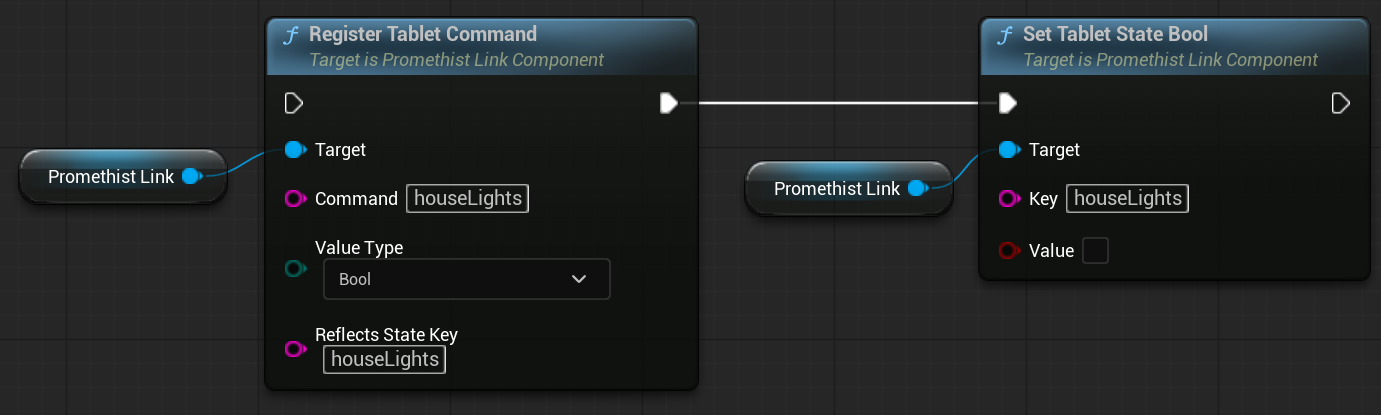
This is discoverability, not permission. An unregistered command dispatches exactly the same, so nothing breaks if you skip it. Registration simply lets a tablet — or somebody writing their own — see what the kiosk accepts without reading your source. Practically, it catches buttons sending unhandled names while building, rather than on site.
Two things to know if you write a client against the handshake:
-
A command list that is absent is not an empty one. Absence means the kiosk does not say, not that it accepts nothing.
-
Do not assume a command is named after the state key it affects. Several of ours deliberately differ, which is why registration names the reflected key separately.
Publish the key on BeginPlay regardless of registration, for the reason in the first rule above.