
Wiring it up in Blueprints
Add Promethist Link to an actor — usually your MetaHuman Blueprint, though any works. The component handles the microphone, the backend connection, incoming speech, and the buffering that keeps playback smooth. You wire up what your project does with all that.
It exposes seventeen events and twenty-four functions. Five of them get you a talking avatar; the rest are there for when you need them. Most installations use perhaps half.
Before you start
Enable the engine plugins the module links against — SocketIOClient, PixelStreaming2,
WebSocketNetworking and AudioCapture. The build fails without them. PixelStreaming2 is required
even for a kiosk that never streams. See
what the plugin needs from your
project.
Get an agent ref by creating an agent in Promethist Studio. Without one, you connect to our
default agent, which is not yours.
|
If your network cannot reach that address, or you point the component at a different backend or
region, either set |
The smallest thing that talks
Bind the events before you call Connect. OnStateChanged starts firing from inside Connect
itself. A graph that connects first misses the early transitions. Moreover, a component’s BeginPlay
runs before its owning actor’s, making this easy to get wrong.
-
Add the component. Drop Promethist Link onto your actor.
-
Bind
OnStateChanged. Where the conversation currently is — see The states, and what you would do with each. -
Bind
OnTranscriptReceived. What the visitor said. -
Bind
OnTTSAudioChunk. The agent’s speech as audio. Feed this to a lipsync solver or whatever else reacts to the voice. -
Call
Connect. Five pins: backend URL, agent ref, locale, region and a test-mode flag. All have defaults, so override what differs. -
Call
Disconnectwhen the session should end.
Two details about Connect are easy to trip over:
-
Region, when not empty, overridesBackendURL. Fill both and your URL is discarded. An unrecognised region falls back to EU with a warning rather than failing. -
It is ignored during a live conversation.
Connectonly acts fromDisconnected,ConnectingorReconnecting. Anywhere else it logs a warning and returns. To switch agent mid-session, callDisconnectfirst, thenConnectwith the new agent ref.
What triggers connecting and disconnecting is entirely yours. BeginPlay and EndPlay are simple
and fine for testing, but nothing in the plugin expects them. A button on the operator tablet, an
actor overlap as somebody walks up, a proximity sensor or depth camera noticing a visitor, an opening
time, a gesture, your own game logic — all wire in exactly the same way.
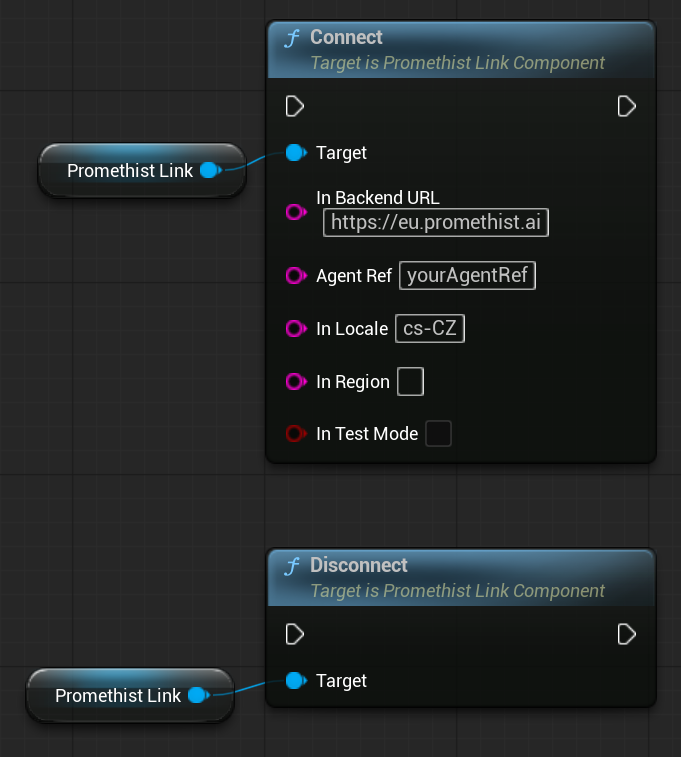
Every function on this page takes the component on a Target pin, which is what that Promethist
Link reference is for.
The states, and what you would do with each
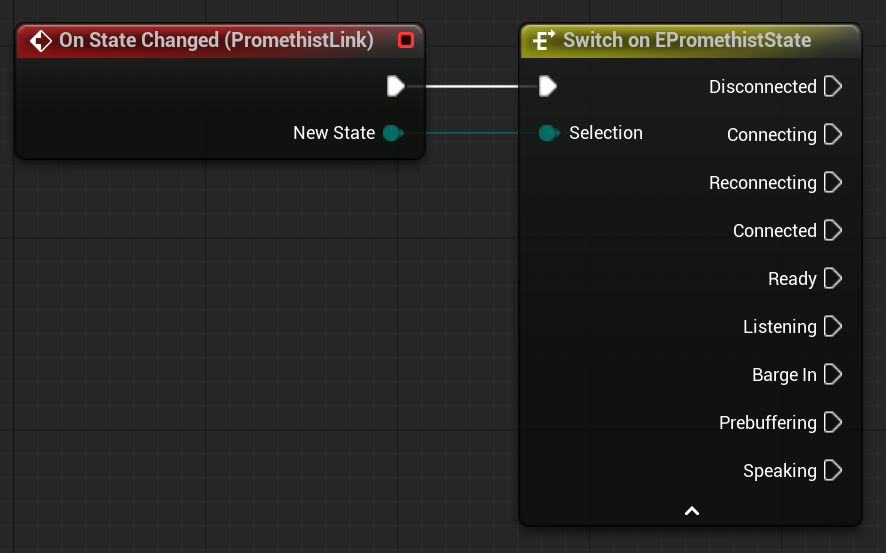
OnStateChanged fires on every transition, and GetState returns the current one.
EPromethistState has ten values. Dragging off New State into a Switch on EPromethistState gives
you an execution pin for each.
Four of them concern the connection and happen once per session:
- Disconnected
-
No connection. The starting state, and where
Disconnectleaves you. - Connecting
-
Handshake in flight.
- Connected
-
Connected, but not yet usable — waiting for the backend to spin up the session, which typically takes a few seconds. This is the gap to cover with a loading state.
- Ready
-
The conversation is live and idle, waiting for the visitor. Entered once per session: later turns return to
Listening, not here.
The other five cycle once per turn — Listening → Thinking → Prebuffering → Speaking, and back to
Listening:
- Listening
-
The visitor is being heard. Entered when the previous reply’s audio finishes draining, and it lasts while they speak and are transcribed.
- Thinking
-
The visitor has finished and the backend is composing the reply. Entered on their final transcript. Nothing is audible, and this is usually the longest pause between turns.
- Prebuffering
-
The reply’s audio has started arriving and is buffering, but nothing is audible yet. Usually brief.
- Speaking
-
The voice is playing.
- BargeIn
-
The visitor talked over the agent. Playback has already stopped by the time you see this, and the component is returning to
Listening.
Reconnecting is the tenth: waiting between retries after an unexpected drop. It works its way
back through Connecting and Connected to Ready automatically.
The microphone transmits from Ready onwards — through all four turn states, including while the
agent speaks. This makes barge-in possible, meaning you never need to re-open the microphone
yourself.
The thinking pause is Thinking, not Prebuffering
The silence a visitor notices runs from when they stop talking until the avatar speaks. Thinking
is that pause, and it is where you should hang a thinking pose.
Prebuffering looks like the obvious candidate, but it is the wrong one. It begins only after the
reply’s first audio has arrived. By then, the backend has finished composing, leaving only a short
buffering wait. A pose wired there barely registers, leaving the avatar motionless during the real
pause — which visitors read as a crash.
If you need this boundary as an event rather than a state, use OnTranscriptReceived with bIsFinal
true — the exact instant Thinking is entered.
What reaches you during a turn
What the visitor said
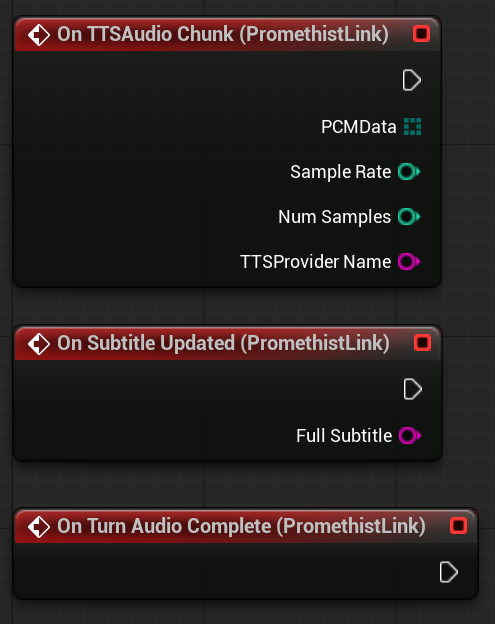
OnTranscriptReceived provides Text and bIsFinal. Interim results arrive while they are still
speaking; the final one means the component has committed to what was said, signalling that a new
agent turn is beginning.
The voice
OnTTSAudioChunk provides a chunk of the agent’s speech, including the sample rate, number of
samples, and a provider key. Feed this to whichever lipsync solver you use — Audio2Face, JALI, Oculus
Lipsync. The plugin has no opinion on which.
Three details matter if you are implementing against it:
-
The audio is mono
int16, handed over as a byte array.NumSamplescounts samples, making the array twice that long. -
SampleRateis the provider’s own rate and can differ per chunk, because the broadcast happens before the component’s internal resample. Honour the pin rather than assuming a fixed rate. -
The provider key is
providerorprovider/REGION— likeelevenlabs/EU— whenever a region is set. An equality test against a bare provider name will never match on a regional deployment, so split on/if you key anything off it. Reading this is useful because an agent can change voice providers between turns.
Chunks reach you before they are audible, since they broadcast on arrival rather than on playback —
earlier by the whole prebuffer at minimum. Driving a solver straight off this pin therefore runs it
early. If alignment matters, buffer the chunks and start your animation when playback begins: on
OnPrebufferReady, or on the transition into Speaking.
This audio does not have to drive a face. For a talking car, a disembodied voice, or a box with a light on it, these are the same chunks you would use, and loudness over time is usually all you need.
The agent’s words
OnSubtitleUpdated carries the agent’s accumulated reply — everything said so far this turn, not
just the newest sentence. Set your text widget directly from it rather than appending.
It does not clear when the turn ends. It fires with an empty string on a barge-in, when the
visitor’s next utterance is finalised, and on a session restart. Consequently, the last sentence
stays on screen through the gap between turns. To remove it sooner, clear the widget yourself — on
OnTurnAudioComplete, or when the state leaves Speaking.
The end
OnTurnAudioComplete fires when the backend signals that no more audio is coming for this turn. It
is a download-finished signal, not a playback-finished one. It arrives while the avatar is likely
still speaking, as everything buffered still has to play out.
So:
-
"The reply is fully received" —
OnTurnAudioComplete. -
"The mouth has stopped moving" — the state leaving
SpeakingforListening.
Use the second one to undo what you set up for the turn. Clearing a lipsync solver or dropping a gesture on the first will cut the avatar off mid-sentence.
Starting playback on your own cue
Left alone, the component starts speaking automatically once it has buffered enough, and you never have to think about it.
Set the bExternalPlaybackControl property on the component to take over that decision. Only then
does OnPrebufferReady fire, and only if something is bound to it. With the flag set but nothing
bound, playback starts normally, ensuring a half-wired character is never left mute.
OnPrebufferReady is the crucial moment: it fires when enough audio has arrived to play the reply
without stuttering. Not on the first chunk, and not when the whole reply has arrived, but when there
is enough cushion to survive the gaps between remaining chunks.
This cushion is measured rather than fixed. The component tracks how unevenly chunks arrive and sizes
the cushion against the slowest arrivals it has seen, meaning a jittery connection waits longer than
a local one. PrebufferMinMs is the absolute floor. With nothing measured yet — a fresh install, or
the first turn through a new voice provider — it defaults to that floor. This is the one scenario
where a reply might begin early and stutter. It keeps what it learns between sessions, so this
settles naturally.

Two limits apply to your cue:
-
StartPlaybackonly works while the state remainsPrebuffering. Anywhere else it logs a warning and does nothing, discarding cues that arrive after a barge-in or a torn-down turn. -
Bind
OnPrebufferReadybut forget to callStartPlayback, and the agent never speaks. Because nothing actually failed, the logs will look entirely healthy.
What you can ignore
Most of the rest exists for kiosks. Putting an avatar in an application requires none of it:
-
The operator tablet —
OnTabletCommand, theSetTabletState…functions,RegisterTabletCommand. Only meaningful if you run the tablet control channel; see wiring your own command. -
Operator controls —
SetPaused,OnPauseChanged,OnVolumeChanged,OnLocaleChanged. These exist so the tablet has something to call. -
Connection recovery —
OnRecoveryAttempt,OnRecovered,OnRecoveryGaveUp. The component retries dropped connections automatically. Bind these only to show the visitor something while it reconnects. -
Level switching —
WaitForSessionParams,EnsureLevelLoaded. For choosing a scene from the page URL before connecting. -
Rich responses —
OnMultimodalInteraction,OnImageInteractionReceived, for agents showing images or asking questions on screen. -
SendTextToAgent— speak to the agent as if the visitor had, without a microphone. Useful for testing or starting a scripted opening.
Out-of-service handling — SetBlackout, ReportHealth, OnBlackoutChanged, OnHealthChanged — is
for unattended kiosks taking themselves offline. You can leave all four unwired, but read the warning
at the top of this page first: the underlying feature is on whether you wire it or not.
The settings
There are twenty-three properties on the component, and most have defaults you should leave alone. These are the ones this page highlights:
-
bAutoBlackoutOnUnhealthyandHealthProbeUrl— see the warning above. The first thing to check if connections fail. -
bExternalPlaybackControl— hands you the decision of when speech starts. -
PrebufferMinMs— the floor under the buffering cushion. Read once atBeginPlay, so mid-session changes do nothing until the next session. -
bEnableWebcam— off unless the agent needs to see the visitor. -
AvailableLocales— the languages offered. The tablet reads this to build its language buttons. -
bVerboseLogging— on while you get something working, off afterwards. It is the difference between a log explaining why no audio arrived and one that does not.
The rest are volume limits, frame-rate caps, render sizing, and pause behaviour. They belong to kiosk deployments rather than wiring the component up.