Agent Management
Creating & Configuring Agents
Creating a New Agent
Go to Assets → Agents and click + Create. The Create New Agent page lets you start from scratch or from a template.
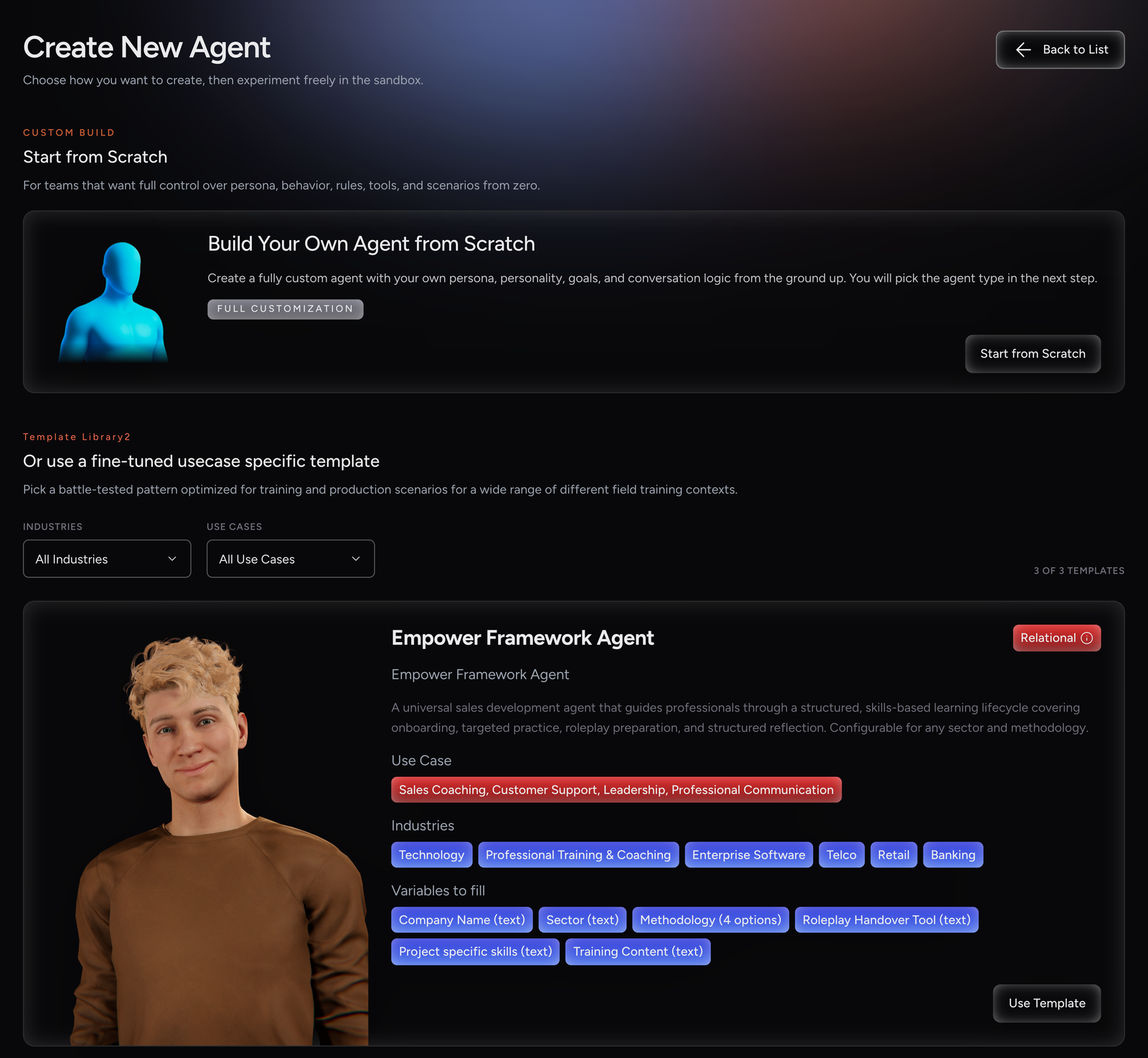
Start from Scratch |
Opens an empty agent form. You choose the Agent Type yourself at the top of the form. |
Use Template |
A good choice for newcomers. Opens the agent form pre-filled from a template. The template sets the Agent Type, and some of its fields may be preset. |
Choosing a Template
Use the Industries and Use Cases filters to narrow the list. Each template card shows:
-
The template name and its type tag, Relational or Lightweight. The tag shows which kind of agent the template builds. See Agent Type for the difference.
-
A title and a short description.
-
Use Case and Industries tags.
-
Variables to fill: the Template Variables you will complete, marked (text) for free text or (N options) for a choice list.
Click Use Template on the card you want. To build your own agent instead, click Start from Scratch.
|
+ Create, Start from Scratch and Use Template are disabled for project Viewers. |
Agent’s Profile
The first section of the form sets the agent’s type and how it is presented to users.
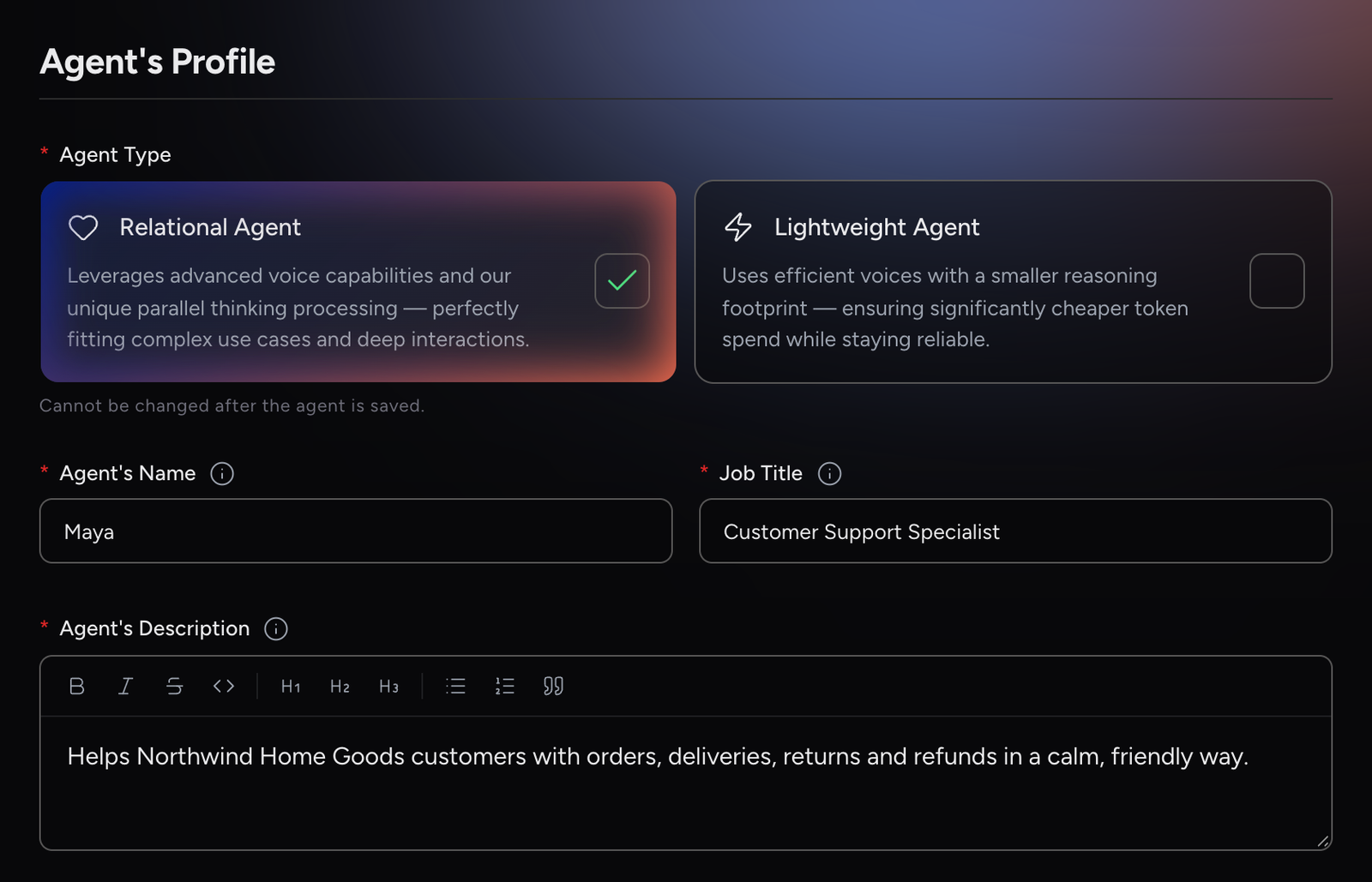
Agent Type
Relational Agent |
Leverages advanced voice capabilities and our unique parallel thinking processing, perfectly fitting complex use cases and deep interactions. This is the default. |
Lightweight Agent |
Uses efficient voices with a smaller reasoning footprint — ensuring significantly cheaper token spend while staying reliable. |
You can only choose the type when you start from scratch. If you use a template, the template sets the type.
|
Agent Type cannot be changed after the agent is saved. If you need a different type, you’ll have to create a new agent. |
Lightweight agents share most of the configuration of Relational agents, but Business Process Steps and Relational Settings are not available on Lightweight agents.
Name, Job Title and Description
Agent’s Name |
A clear, human-friendly name, for example Maya. It identifies the agent across the platform. |
Job Title |
A short role label shown in the app, for example Billing Support Specialist. |
Agent’s Description |
A short, user-facing line shown in the app that sets expectations, for example Helping you get the most out of your plan. |
|
Job Title and Agent’s Description are shown to users in the app, but they don’t change how the agent behaves. Put instructions in Objective, Guardrails and Character & Backstory instead. |
Template Variables
This section appears only when you create an agent from a template. It shows the Chosen Template and one field per variable. Each variable asks for one piece of information about your own project, for example your company name, your sector or the training content the agent should use. Replace the example text with your own.
-
Variables with predefined options are dropdowns. Pick one value.
-
Text variables are pre-filled with the template’s example text. Replace it with text for your own context. Whatever is in the field when you save is what the agent uses.
You can use @Reference in any text Template Variable to reference a project asset, such as a Knowledge Base, Interactive Content, Integration, Skill or Content Navigation item, directly inside the field. Click Reference (or type @) and pick the asset you want to insert. See Assets Referencing.
|
Locked fields. Some templates lock certain fields, so that the content they were designed with stays as it is. A locked field isn’t shown in the form. Which fields are locked depends on the template: with some templates you can edit everything. |
|
Fill in every Template Variable and replace the example text. A variable you leave empty is not saved and stays unset. |
Agentic Purpose
|
What is Agentic Purpose for? This is where you tell the agent what it’s supposed to do, how it should behave, and what path to follow in a conversation. Think of it as writing a job description and a script — combined. It has three main parts:
The agent uses all three together. It will follow the steps, stay within the guardrails, and keep the objective in mind throughout — adapting its tone and approach based on how the conversation unfolds. The section also holds Relational Settings and Remembers users. |
|
All text fields here support rich text formatting, headings, lists, bold, and more. Well-structured instructions are easier for the agent to follow. You can drag the bottom edge of a field to make it taller. 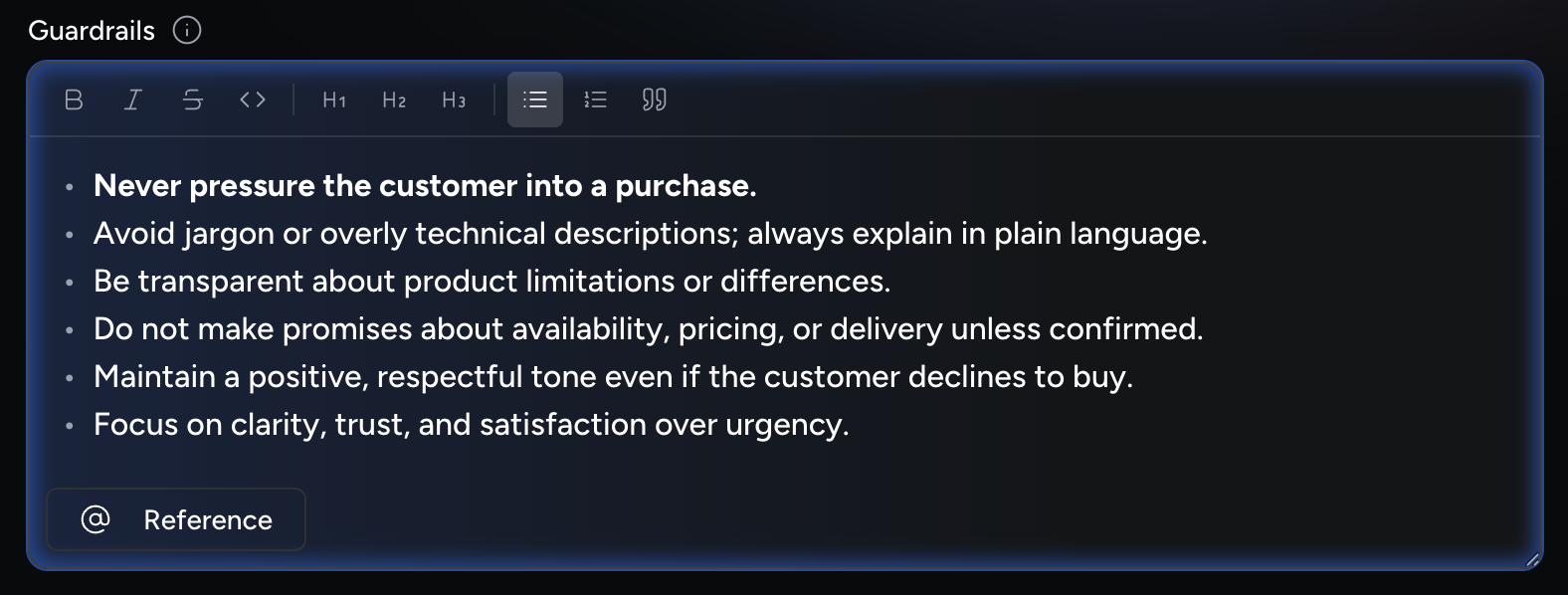
|
Objective
Define the primary and subsidiary objectives.
-
Primary objectives are broad and overarching
-
Sub-objectives break down how the agent achieves the primary goal
Example:
• |
Your primary objective is to inspire the client to love our brand. |
• |
Your job consists in making the clients familiar with your brand’s intentions and the most recent product offer. |
• |
In order to do your job well, you should inquire into the client’s needs and present the brand in a fresh way. |
• |
Avoid pushing sales too hard if the client is hesitant. Focus on personalized engagement. |
Guardrails
Rules and boundaries agents must obey.
-
Cover sensitive topics requiring expertise (e.g., psychological treatment, financial advisory)
-
Ensure non-standard customer requests are safely redirected back to the business process path
|
When two or more languages are selected in Allowed Languages, do not add a guardrail that restricts the agent to speak only one language. This conflicts with the multilingual setup and can cause problems with speech recognition. |
Business Process Steps
|
Business Process Steps is available on Relational agents only — it does not appear in the configuration for Lightweight agents. |
This is the "golden path" of the ideal interaction. Write it step-by-step.
Step 1 |
Greet the client and explain the advantages of your offer. |
Step 2 |
Learn more about the client’s needs. |
Step 3 |
If the client seems interested, propose the best-fit product. If not, inspire interest with unexpected product features. |
Step 4 |
Direct the client to more information and take a memorable farewell. |
Assets Referencing
You can reference project assets in Objective, Guardrails, Business Process Steps and text Template Variables. Click Reference under the field, or type @, then search and pick an asset. The reference is inserted as a chip.
Knowledge Management |
Ground the agent’s responses in specific content. |
Interactive content |
Trigger structured interactions like forms, images, web views or handovers. |
Integrations |
Call an external tool during the conversation. Each tool of an MCP integration is listed separately as Integration / tool, so you reference the exact tool you want. |
Skills |
Define what is being trained. In the Objective, reference Skills to establish the skill catalog for the session. In the Business Process Steps, reference a skill to select what is being practised and route to the right scenario. Only Skills available in your project can be referenced. |
Content Navigation |
Offer a navigation item to the user as a quick action. Folders can’t be referenced. |
If the asset you need doesn’t exist yet, click Add New in the Knowledge Management, Interactive content or Integrations group. This creates the asset without leaving the agent and inserts the reference into the field. Skills and Content Navigation items can’t be created from here.
Whether an agent can use an asset depends on the asset’s visibility:
-
Global assets: Available to every agent automatically. Referencing them is optional but helps the agent use them at the right moment.
-
Non-global assets: Available only to agents that reference them. Without a reference, the agent can’t use them. See Assets Visibility.
|
Add a short instruction with each reference that says when to use it, rather than the reference on its own. |
Step 5 |
At the end of the interaction, ask the user how satisfied they were and show the feedback form (reference the product_feedback_form Interactive Content here; it is stored as |
|
A reference to an asset that doesn’t exist, or a reference typed by hand with a typo, doesn’t stop you from saving, but the agent can’t use it. Insert references with Reference or |
Relational Settings
|
Relational Settings is available on Relational agents only. |
Use the slider to set how strictly the agent follows the Business Process Steps compared with building the relationship.
Relational Focus |
More conversational and flexible, with lighter process enforcement. Example: Brand loyalty and empathy-driven conversations. |
Balanced |
Completes the key steps while staying warm and adaptive. Example: Informing clients about new offers while still executing specific sub-goals. |
Task Focus |
Follows the steps tightly. Example: Mortgage procedure with no deviation allowed. |
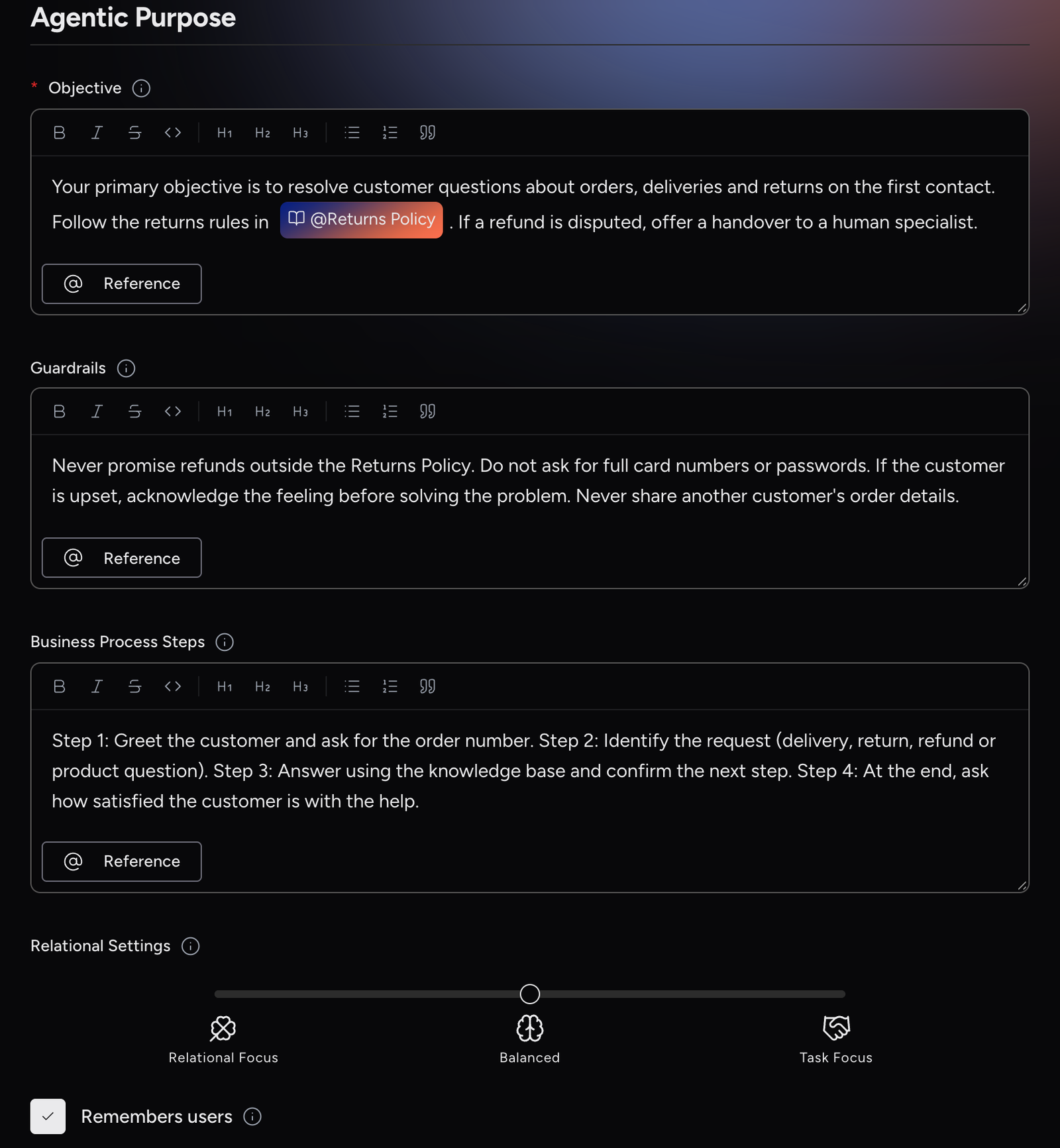
Remembers users (memory control)
What it is
A checkbox that controls whether the agent recalls previous conversations with the same user. It is checked by default.
When to use it
Uncheck it for one-off, shared or public interfaces (for example kiosks, or practice roleplays) where each conversation should be treated as new. Keep it checked for relationship-based use cases (for example account management, or support follow-up) where continuity matters.
How to configure
Go to Agentic Purpose → Remembers users.
-
Checked: The agent remembers and can refer to past interactions.
-
Unchecked: Every conversation is treated as a new user; nothing is carried over between sessions.
If the agent was created from a template that locks this setting, the checkbox isn’t shown.
|
Agent-specific setting. For concepts, policies, and governance, see Memory & Relational Intelligence. |
Agent’s Identity
Avatar
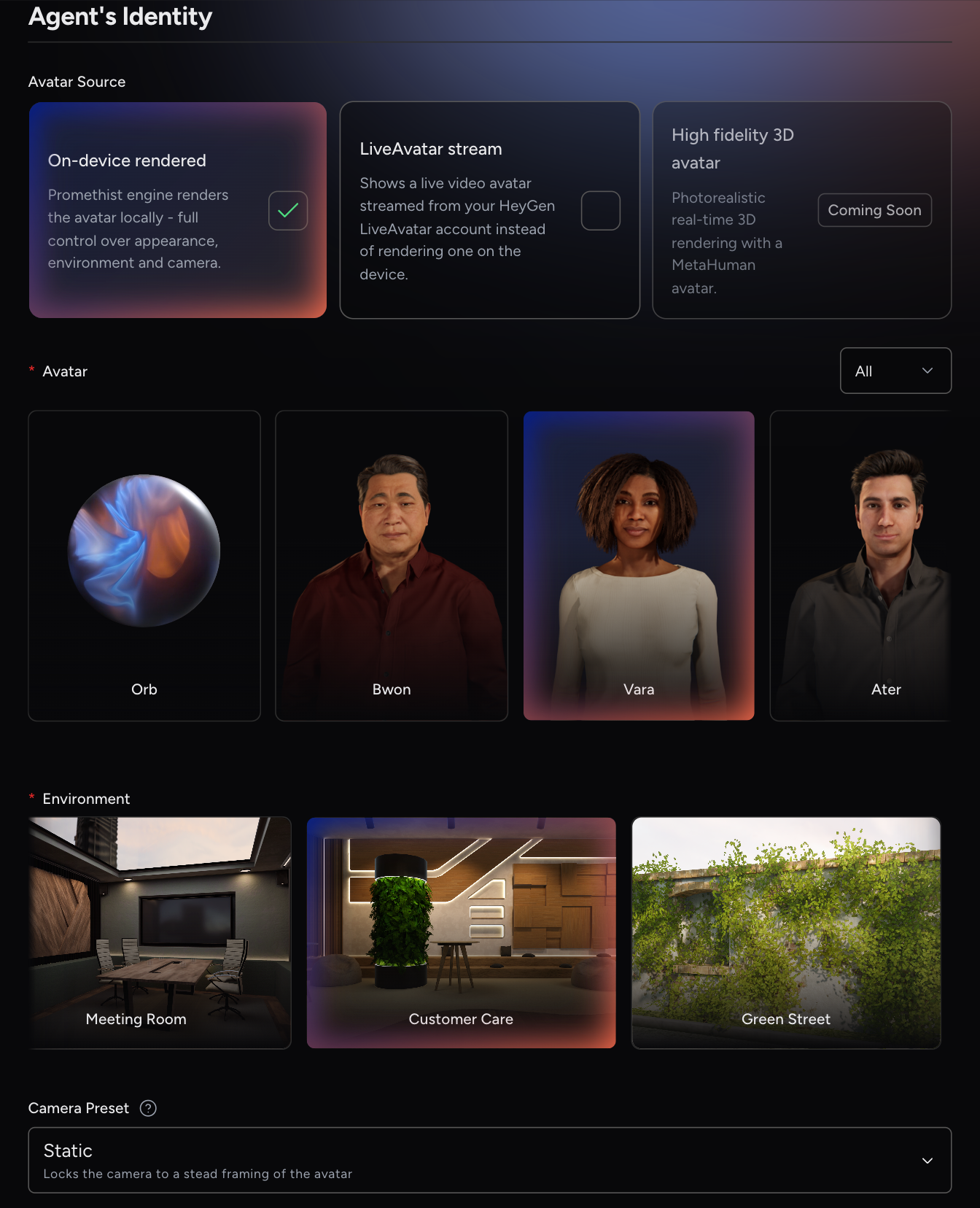
Select the look of your agent. The Avatar Source determines how the avatar is produced:
On-device rendered |
The Promethist engine renders the avatar locally. You choose the Avatar, the Environment (Relational agents only) and the Camera Preset. |
LiveAvatar stream |
Shows a live video avatar streamed from your HeyGen LiveAvatar account instead of rendering one on the device. Requires a LiveAvatar ID. |
High fidelity 3D avatar |
Coming soon. |
With On-device rendered, pick an avatar from the list. Use the filter above the list to show only female or male avatars. The first option, Orb, is an abstract animated orb instead of a human avatar; it needs no environment.
When you select LiveAvatar stream, enter the LiveAvatar ID of the avatar from your HeyGen LiveAvatar account, for example 0c7e41b9-6d3a-4f52-8e19-b5a2d0c93f67. Environment and Camera Preset are not used with a LiveAvatar.
LiveAvatar stream also needs a Live Avatar API Key, set in Project Settings or Account Settings. When a key is set at both levels, the project-level key takes precedence.
|
If no key is set, the LiveAvatar ID field is disabled and a LiveAvatar API Key Missing warning is shown. If you can edit the project, click Go to Settings in the warning to add the key. |
Environment
Select the environment in which the agent appears. The environment sets the visual background for the interaction. This field is hidden when you choose the Orb avatar, and Lightweight agents don’t have it.
Camera Preset
Control how the camera behaves during a conversation. Camera Preset is available with On-device rendered avatars only.
Static |
Keeps the camera on a steady framing of the avatar, similar to a video call. This is the default for agents built from scratch. |
Dynamic |
Automatically changes camera angles and shot types for a more cinematic feel. |
If the agent was created from a template that locks this setting, the field isn’t shown.
|
If the avatar list doesn’t load, an Asset Server Unavailable warning appears. You can’t change the avatar or environment until it’s back, but you can still edit the voice and everything else. |
LLM Model
Choose the AI model provider that powers the agent’s voice conversation, for example OpenAI, Azure OpenAI or Internal LLM. The available options depend on your platform. The Voice list shows only voices of the selected provider.
When you switch to another provider, the platform picks a voice of the same gender from that provider where one exists. That voice is marked with a note asking you to check that it still fits.
|
If you change the LLM Model of a saved agent, a Model changed warning appears. The agent’s behaviour may change, so test it again before you promote it. |
Voice
Select the voice you want your agent to speak with. Use the Language and Gender filters to narrow the list. Each voice card lists the languages the voice supports; click a language to hear a sample. The voice determines the options available in Allowed Languages.
Allowed Languages
Select the languages this agent may speak. Choose at least one. You can only choose languages the selected voice supports; other languages are shown greyed out.
When you select or change the Voice, Allowed Languages is filled with all languages of that voice. If you don’t need all of them, remove the ones you don’t want.
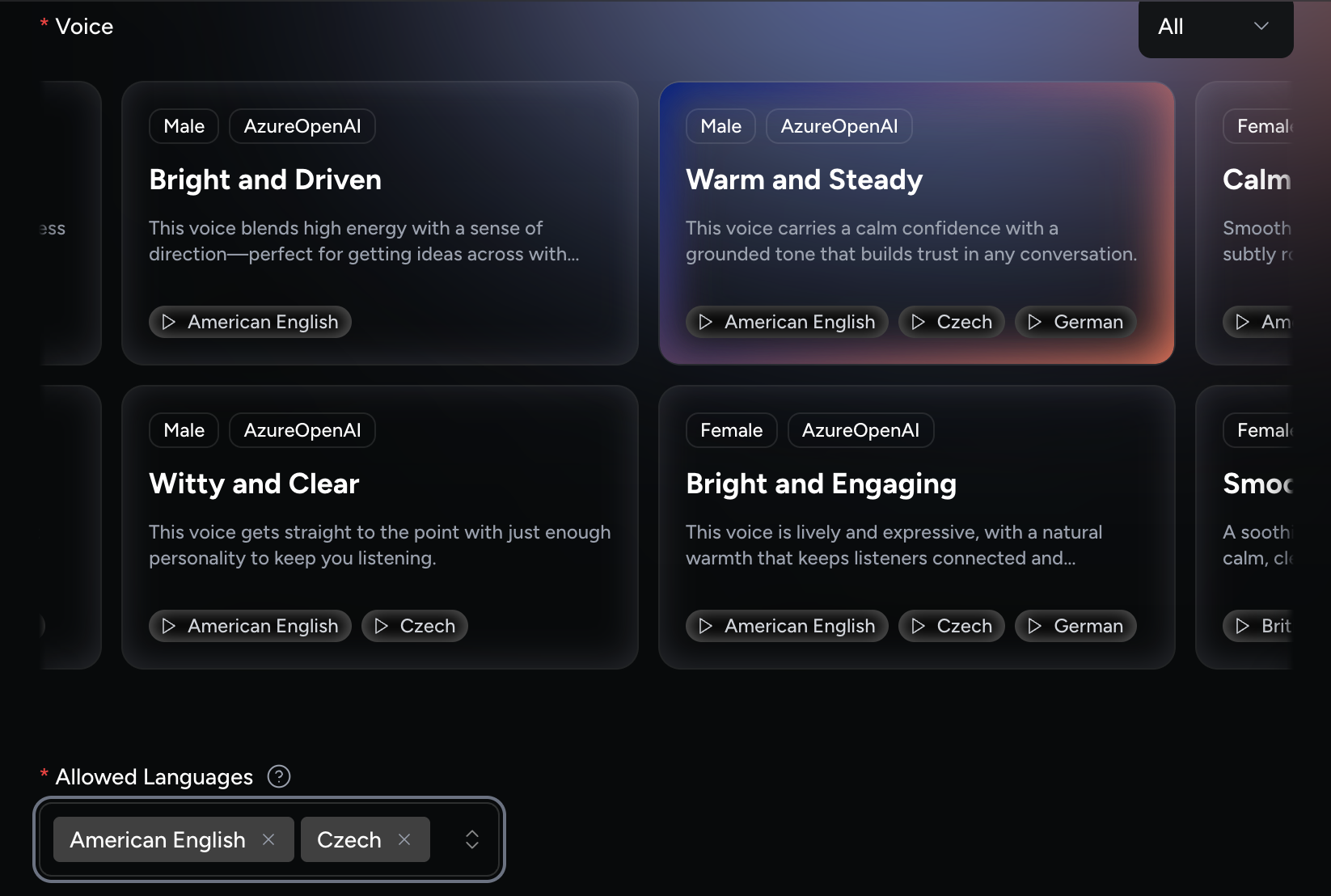
Your voice supports American English, Czech, and German, but you only want the agent to speak American English and Czech. Remove German from Allowed Languages.
|
Choose the voice first and adjust Allowed Languages afterwards. Changing the voice again replaces your language selection. |
When a conversation starts, the platform matches the agent’s allowed languages against the Language setting on the user’s device (app) to decide which language the agent speaks:
-
The primary language is the highest-priority match between the two lists.
-
Any remaining matches become additional languages the agent can also speak.
The agent’s allowed languages are American English and Czech, and the user’s app is set to Czech, English:
-
Primary language → Czech
-
Additional language → American English
Character & Backstory
Describe who the agent is, so interactions feel natural and consistent.
Elements can include:
-
Character traits, tone of voice, style of expression, and backstory
-
Previous experiences, likes/dislikes, boundaries
-
How the agent behaves in tricky moments, such as confusion, frustration or sensitive requests
-
Personal views on topics
If the agent was created from a template that locks this field, it isn’t shown.
|
A well-written character and backstory aligned with the agent’s role makes interactions feel natural and memorable. |
User’s Evaluation
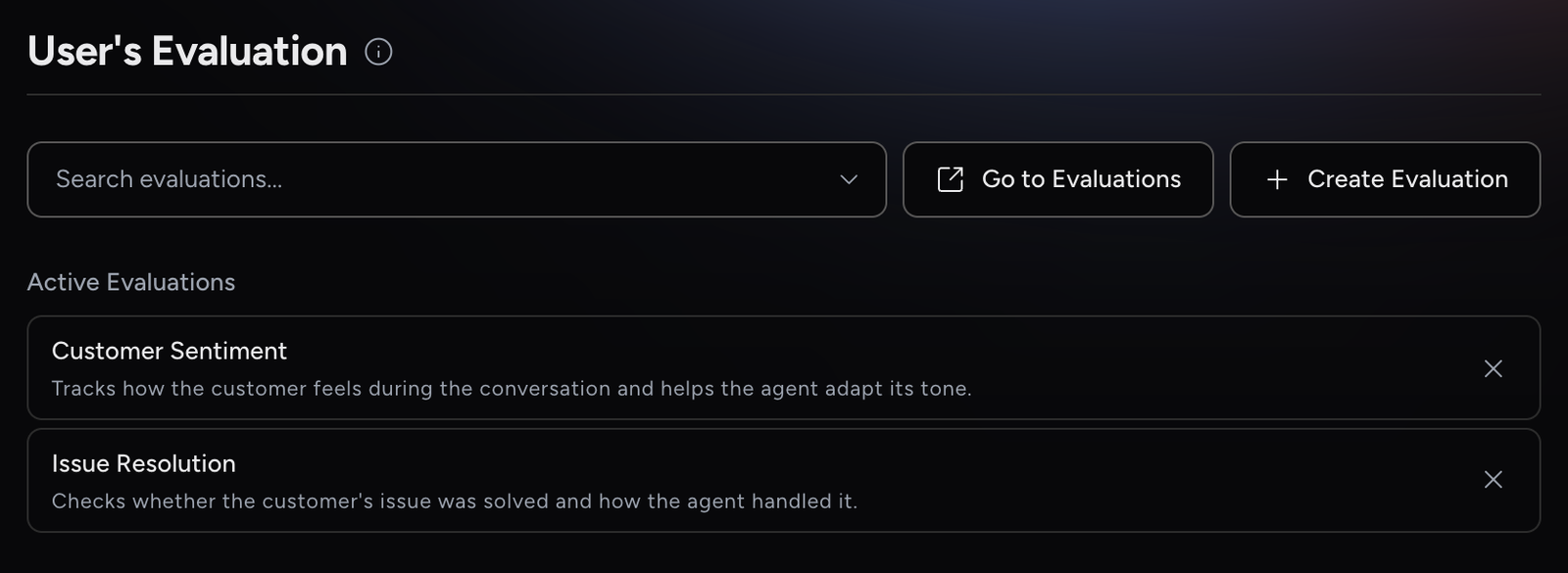
The last section of the form attaches evaluations to the agent. These evaluations assess the user’s side of the conversation, not the agent. They run during the conversation or after it ends.
-
Click the search field to list the project’s evaluations, and click one to attach it. You can attach several. Attached evaluations appear under Active Evaluations.
-
Click an attached evaluation to open it, or click X to remove it.
-
Click Go to Evaluations to browse all evaluations, or Create Evaluation to start a new one. See Evaluations.
|
Attaching an evaluation makes it run for this agent’s conversations. It doesn’t mean the agent can read the results: a post-conversation result reaches this agent’s next conversation only if the evaluation has Session agent turned on. See Attaching Evaluations to Agents. |
| Evaluations that score your agent during automated tests are attached to simulated users instead. See Agent Evaluations. |
Saving Your Agent
Click Save to create the agent. When you edit an existing agent, the button is Save Draft. If a field is missing, a message tells you which field to fix and the form scrolls to it. If you try to leave the page with unsaved changes, you are asked to confirm.
Revisions
Every time you save, a new Draft revision is created on top of the latest one. You can only edit the latest revision; older revisions open read-only, without a save button. For promoting, reverting and cloning revisions, see Testing & Publishing.
|
Viewers can open agents but can’t change them. The form is read-only and has no save button. |
Troubleshooting
I can’t change the Agent Type. |
The type is fixed once the agent is saved, and set by the template if you used one. Create a new agent to use a different type. |
A field I expected, such as Objective or Camera Preset, is missing. |
The template locks it, so it isn’t shown. Other fields depend on your choices: Lightweight agents have no Business Process Steps or Relational Settings, the Orb avatar and Lightweight agents have no Environment, and LiveAvatar stream has no Environment or Camera Preset. |
My language selection was reset. |
Changing the Voice replaces Allowed Languages with all languages of the new voice. Adjust the list again after changing the voice. |
There is no Save Draft button. |
You are viewing an older revision, or you are a Viewer on this project. Open the latest revision from the revision menu, or ask for the Editor role. |
The agent doesn’t use a knowledge base or integration. |
Non-global assets must be referenced in Objective, Guardrails or Business Process Steps. See Assets Referencing. |
The LiveAvatar ID field is disabled. |
No Live Avatar API Key is set for the project or account. See Avatar. |