Platform Administration
Plans, Pricing & Billing
PromethistAI offers three subscription plans to suit different needs, from individual exploration to enterprise-scale deployments.
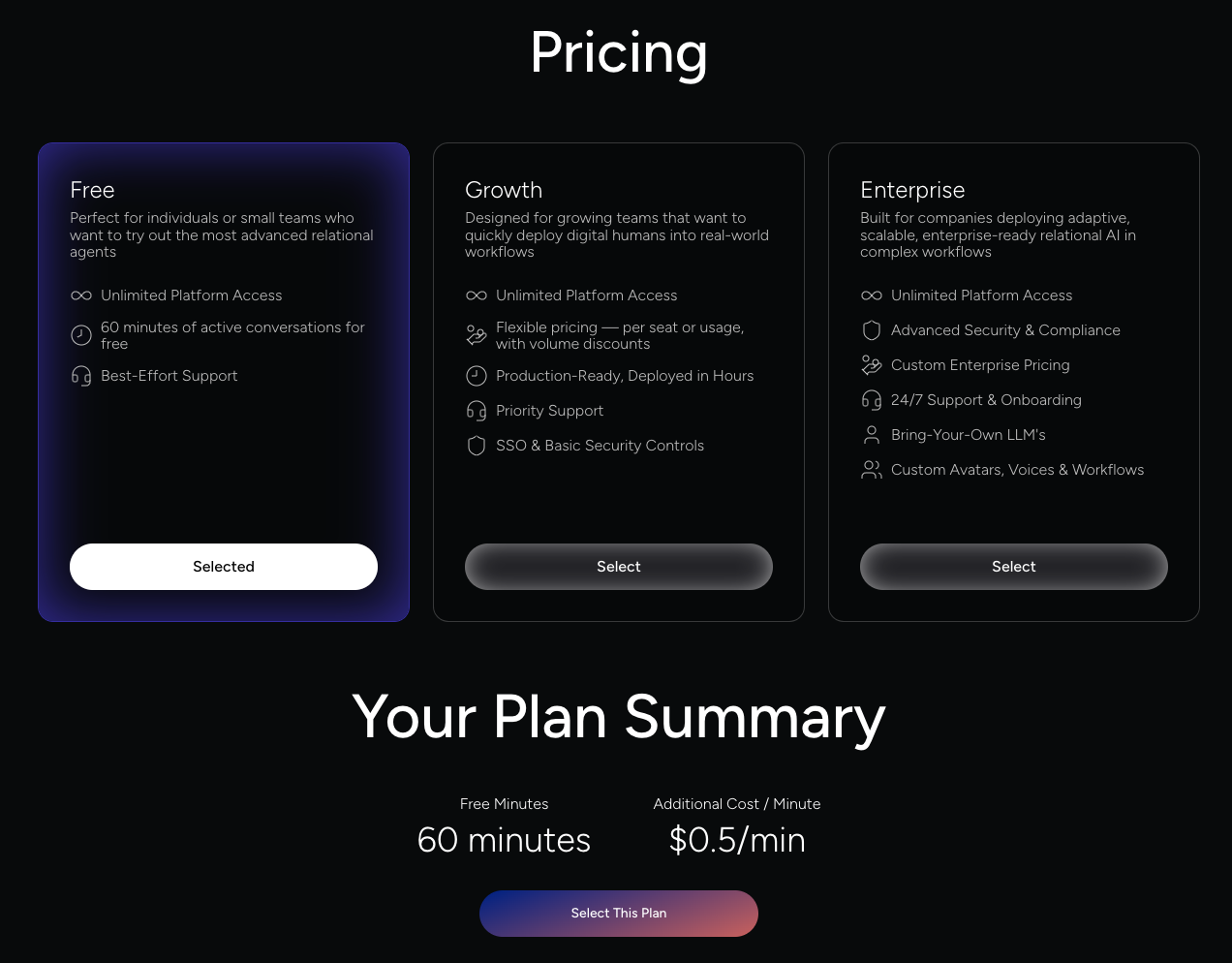
Overview of Subscription Plans
-
Free – Perfect for individuals or small teams trying out the most advanced relational agents.
-
Growth – Designed for growing teams that want to quickly deploy digital humans into real-world workflows.
-
Enterprise – Built for companies deploying adaptive, scalable, enterprise-ready relational AI in complex workflows.
Plan Comparison
| Feature | Free | Growth | Enterprise |
|---|---|---|---|
Platform Access |
Unlimited |
Unlimited |
Unlimited |
Active Conversation Minutes |
60 minutes included |
Flexible (per-seat or usage-based with volume discounts) |
Custom |
Cost for Additional Minutes |
$0.5 per minute |
$0.50 per minute beyond the plan volume |
Custom |
Support |
Best-Effort |
Priority Support |
24/7 Support & Dedicated Onboarding |
Security & Authentication |
Basic |
SSO & Basic Security Controls |
Advanced Security & Compliance |
Deployment Speed |
– |
Production-Ready, Deployed in Hours |
Custom Workflows |
Customizations |
– |
– |
Bring-Your-Own LLMs |
Pricing Model |
Free + pay-per-use overage |
Flexible per-seat or usage-based |
Custom Enterprise Pricing |
Selecting or Upgrading Your Plan
Plans are chosen in Account → Billing, which only account Owners can open.
To select the Free plan:
-
The Free card is selected by default. Review Your Plan Summary below the cards.
-
Click Select This Plan to continue in Stripe.
To select the Growth plan:
-
Click Select on the Growth card.
-
Choose your preferred billing period (Monthly or Yearly).
-
Select the license parameter (Minute-based or Seat-based).
-
Adjust the monthly volume slider to match your expected usage.
-
Review the calculated price and any savings.
-
Click Select this Plan and provide payment information, or click Contact Us to talk to the team first.
To select the Enterprise plan:
-
Click Select on the Enterprise card.
-
The Enterprise summary appears below the cards, with custom licensing and pricing.
-
Click Contact Us to reach the sales team for tailored licensing and pricing.
Payment details are entered securely in Stripe.
|
Prices are in USD and exclude all taxes, levies and duties. Fair Usage Policy: minutes don’t roll over to the next month, and one seat includes up to 360 minutes of active conversations per month. |
Once your subscription is active, the plan cards are replaced by Your Active Subscription. To change your plan, click Change Tier to contact support.
Higher-plan features become available immediately after completing the process (payment for Growth, or sales confirmation for Enterprise).
Billing & Usage
-
Billing is applied at the account level, regardless of the number of projects or agents.
-
Charges are based on Conversational Minutes, the total active interaction time between agents and end users. Conversations run by automated test suites also use minutes and appear as Testing minutes in the usage report.
-
All payments are processed securely via Stripe.
-
The billing page shows your usage, your subscription status and your invoice history. See The Billing Page.
-
Some advanced features (SSO, premium analytics, custom integrations, Bring-Your-Own LLMs, etc.) are available only on Growth or Enterprise plans.
The Billing Page
Account → Billing is visible to account Owners only. Below the plan cards, the Billing section shows:
Usage this month |
Your conversational minutes for the period selected in the Minutes Usage report (last 30 days by default). |
Subscription |
The status of your subscription, for example active. Go to payments opens the Stripe portal, where you can update your payment details. If the account has no subscription yet, a Free Tier card with Subscribe is shown instead. |
Minutes Usage report |
A daily chart of Minutes and Testing minutes. Choose From and To dates, or Last 7 days, Last 30 days or Last 1 year. |
Invoice History |
One row per invoice: Month, Status, a link to the invoice in Stripe, the PDF, and the Cost. |
Best Practices
-
Start with the Free plan to evaluate capabilities and estimate usage.
-
Use the Growth calculator to find the most cost-effective volume and billing options.
-
Monitor usage reports regularly to forecast spend and avoid unexpected overage.
-
Use separate accounts when strict billing separation or compliance isolation is required across divisions.
-
Keep the email address in your Stripe billing details actively monitored for invoices and important notices.
By choosing the right plan and managing usage effectively, you can scale PromethistAI confidently—from your first agent to enterprise-wide deployments.